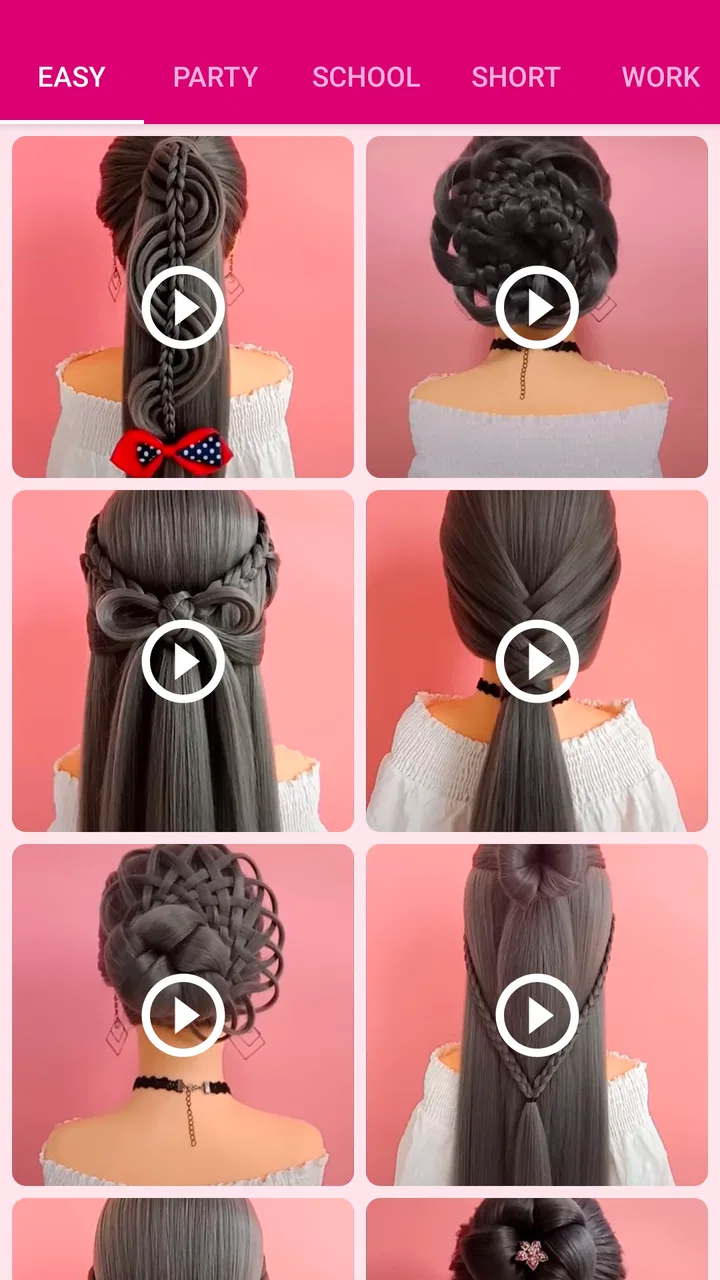
Girls Hairstyle Step By Step
- 4.0
- Rating
- 10.00M
- Installs
- Free
- Price
 Analysis by App-foxy
I tried Girls Hairstyle Step By Step as a practical beauty app rather than as a simple gallery, and that distinction matters. Its main purpose is to help you follow hairstyle instructions at your own pace, whether you are getting ready alone, helping a child before school, or sharing a phone with someone who wants a few ideas for a different look. The experience is straightforward: choose a style, study the sequence, and use the visual guidance to recreate it with your own hair.
That simplicity is the app’s strongest quality. I did not need to understand complicated beauty terminology before exploring it, and the step-by-step format feels more useful than scrolling through finished hairstyle photographs with no explanation. It is a free Beauty app from Ms. Beautician, rated for Everyone, and it has attracted over five million installs. Those details suggest that it is aimed at casual, broad household use rather than professional salon work.
How it fits into everyday hairstyle routines
The most realistic way to use this app is with the phone placed somewhere visible while you work. For example, imagine a busy morning before school: one person opens a hairstyle guide, another gathers a brush and hair ties, and both pause between steps to check the next part. The app can make that routine less dependent on memory, especially when the person doing the hair is still learning how to separate sections or hold a braid in place.
You May Also Like

 AccuWeather: Weather Radar
AccuWeather Review: A Quick, Clear Forecast for Everyday Decisions
For everyday plans, the best forecast is the one you can understand quickly. AccuWeather makes rain timing, radar, and local conditions easy to act on, with a few trade-offs.

 Hill Climb Racing
Why Hill Climb Racing Still Turns Crashes Into One More Run
A tiny car, a bumpy hill and one more upgrade: Hill Climb Racing keeps resurfacing because its simple chaos makes every near-miss feel personal.

 AliExpress - Shopping App
AliExpress Makes Global Shopping Feel Personal, but Shoppers Bear the Risk
AliExpress turns a global marketplace into a pocket-sized discovery engine. Its reach is useful, its shopping loop compelling, and its trade-offs easy to miss.

 Lords Mobile: Kingdom Wars
Lords Mobile Is a Kingdom-Building Routine, Not a Quick Match
A case-by-case verdict on the building, battles, device demands, and social commitments that make Lords Mobile rewarding for some players and exhausting for others.

 PDF Scanner app - TapScanner
TapScanner Makes Paperwork Easier to Capture, Check, and Share
TapScanner makes scanning with a phone feel less like a rescue operation and more like a dependable step in getting work done. Its capture tools are useful, though not flawless.

 Block Blast!
 Shows How Much a Puzzle Game Can Leave Out
A quiet grid game shows why puzzle players increasingly value instant clarity, repeatable skill and low-pressure play—and where the genre still needs to catch up.
More From Our News Desk
View All News


I found that the visual, sequential approach is particularly helpful for styles that look easy when finished but become confusing halfway through. A completed photo may show the result, but it does not tell you when to cross a strand, where to begin a twist, or how much hair to include. A guided sequence gives the process some order. It is still necessary to watch carefully and adjust for the person’s hair, but the app provides a useful reference point.
It also works well for a shared-device situation. A parent might keep the phone nearby while helping a child choose a style, or siblings could take turns selecting something for one another. Since the app is free and intended for Everyone, it is easier to treat it as a casual household resource rather than something reserved for one person. Still, shared use requires ordinary boundaries: agree who is using the phone, avoid handling it with wet or product-covered hands, and keep the device out of the way of brushes and clips.
That shared setting reveals one of the app’s less obvious strengths. It can turn hairstyle practice into a small coordination exercise. One person can read the next instruction while another works, and the roles can switch when the style becomes more familiar. This is more useful than it sounds because many hairstyle mistakes happen when the person styling cannot comfortably look at the screen and manage the hair at the same time.
What I would prepare before opening a guide
I recommend gathering the basic tools first instead of starting with the phone in one hand and searching for accessories with the other. A brush, comb, ties, clips, and a mirror are usually more important than speed. If the selected guide needs something you do not have, it is better to discover that before separating the hair.
Lighting also makes a difference. A dim screen can be hard to follow beside a mirror, while strong light on the display may make it difficult to see the hair clearly. I prefer placing the device slightly to one side, where I can glance at it without turning away completely. This small adjustment reduces the temptation to stop after every instruction and helps the process feel more continuous.
For a child, I would choose the style together before beginning. That prevents a common household problem: one person starts a complicated look while the other expected something quick. The app encourages experimentation, but not every guide will suit every length, texture, or level of patience. A short discussion at the start is enough to make the session smoother.
Learning rather than copying blindly
The app is most valuable when you treat its guides as a framework, not a guarantee that every result will look identical. Hair thickness, curl pattern, length, and the tightness of each section can change the final appearance. I found it more productive to focus on the order of actions than on reproducing a picture perfectly.
A useful technique is to preview the whole guide before touching the hair. Look for the point where the style changes from preparation to construction, and notice whether the final steps involve securing, loosening, or arranging the hair. This gives you a mental map and helps avoid pulling apart an earlier section because the next stage was unexpected.
Another practical tip is to use a loose first attempt. Beginners often tighten every strand immediately, which makes corrections difficult and can make the style uncomfortable. Following the early steps with moderate tension leaves room to adjust the shape. Once the structure looks right, the final securing step can be firmer. The app does not replace judgment here; it gives you a sequence to interpret.
Boundaries when the phone is shared
Because the app may be used by several people on the same device, I would keep expectations clear about what it is and is not doing. It is a hairstyle guide, not a household organizer, appointment system, or personal account space. The app should not be treated as a place to record who chose a style or who is responsible for the next turn. That coordination still belongs with the people using it.
This matters especially when children are involved. A child can choose a look and help with simple steps, but an adult should decide whether the style is suitable for the child’s hair and whether the tools are being used safely. The Everyone rating makes the app broadly approachable, yet an age rating does not remove the need for supervision around brushes, clips, heat, or tight hairstyles.
I also prefer keeping the phone unlocked only for the time needed to follow the guide, then returning it to its normal place. On a shared device, this avoids confusion about who is using it and keeps the hairstyle session separate from unrelated personal activity. There is no reason to hand over the device indefinitely just because someone wants to view a guide.
For families, the best arrangement is simple: one person selects the style, another prepares the tools, and the person with the most experience handles the tricky parts. That division makes the app more effective without pretending it includes family-management features. It also gives younger users a chance to participate without making them responsible for decisions they are not ready to make.
Who will get the most from it
I think this app suits beginners, parents helping children, and anyone who wants a visual reminder while practicing familiar techniques. It can also help someone who usually repeats the same ponytail or braid and wants a gentle push toward something different without committing to a salon visit.
It is especially useful when the goal is a presentable everyday style rather than a highly customized professional finish. If you have limited time, the guides can help you decide whether a look is realistic before you spend several minutes trying to build it. That decision-making value is easy to overlook: sometimes the best result is not completing the most elaborate style, but choosing a simpler one early enough to avoid frustration.
The app can also serve as a teaching aid between two people with different skill levels. An older sibling or parent may know the technique but struggle to explain every movement. Showing the sequence on screen gives the learner something concrete to watch. Over time, the learner may need the app less often, which is a sign that the guidance is doing its job.
Where another option may be better
I would not choose this app as my only resource for professional styling, special-event preparation, or a look that must match a particular face shape or outfit. A salon professional can adapt instantly to hair condition and provide live correction, while a video platform may offer slower demonstrations, spoken explanations, and creators with very different hair types. Those alternatives are better when you need detailed adaptation rather than a compact sequence.
It may also be a weaker fit for someone who learns almost entirely through motion. Step-based visual instructions can show progression, but they do not necessarily communicate the feel of tension, the angle of the hands, or how quickly to move. In that case, a full demonstration video may be easier to follow. I would use this app to understand the structure, then look for another learning method if the hand movements remain unclear.
Hair texture is another important trade-off. A guide can inspire an idea without being a precise prediction of the result on every head of hair. People with very thick, very fine, short, or highly textured hair may need to change the section size or use different securing methods. That is not a failure of the concept, but it means the app rewards flexible thinking more than literal copying.
Version, access, and the overall experience
The app is currently at version 1.0.6 and works from Android 5.0 onward, which makes it accessible on many older Android devices. That is useful in a household where the shared phone is not the newest model. I would still place the device where the screen can be seen clearly and avoid relying on it as the only mirror or instruction source during a complicated attempt.
There is no purchase barrier to trying it, since the app is free. That makes experimentation less stressful: you can open it before a school morning, a casual outing, or a family styling session and decide whether the guides suit your needs. The average rating is 4.1, a solid but not flawless result, and the app has around nine thousand ratings. I read that combination as a reason to approach it positively while keeping expectations realistic rather than assuming every user will find every guide equally clear.
The developer, Ms. Beautician, has kept the concept focused on hairstyle guidance. I appreciate that focus because the app does not need to become a large beauty platform to be useful. Its value comes from reducing the gap between seeing an attractive hairstyle and understanding the order in which to attempt it.
Small workflow changes that improve results
My preferred workflow has four stages. First, choose a style that matches the available time and the person’s hair. Second, preview the guide without starting. Third, complete the early sections loosely so corrections remain possible. Finally, check the finished shape in a mirror from more than one angle. This process prevents the common mistake of judging the style only from the front.
When working with a child, I would add a comfort check before securing anything tightly. A hairstyle that looks neat but pulls at the scalp is not a good result. I would also let the child decide whether the style feels comfortable enough to keep. The app can guide appearance, but the person wearing the hairstyle has the final say about comfort.
For shared use, I would take a quick mental note of where the current guide stopped before handing the phone to someone else. Since the app is not a coordination tool, the users need to manage their own place in the process. A simple spoken reminder such as “we are at the securing step” is enough and avoids restarting or skipping ahead.
These habits reveal the app’s real role. It is not an automatic stylist and it does not remove the need for practice. Instead, it is a visual reference that makes practice more organized. That is a modest promise, but it is also the promise it can meet most consistently.
My household verdict
After using it as a casual guide, I would recommend Girls Hairstyle Step By Step to people who want approachable hairstyle ideas and a clear sequence to follow. Its free access, Everyone rating, and compatibility with older Android devices make it convenient for shared household use. I especially like it for parent-and-child sessions, beginner practice, and mornings when a familiar style needs a small change.
I would not recommend relying on it for expert-level customization or for anyone who needs detailed spoken demonstrations. The guides still require patience, a mirror, suitable tools, and the willingness to adapt the technique to real hair. A different resource may be better when texture, occasion, or precision is the main concern.
For me, the app succeeds because it keeps the learning process visible. It gives a family or individual something concrete to follow without turning a simple hairstyle into a complicated project. If you approach it as a starting point rather than a perfect-result machine, this is a useful free beauty companion for everyday practice. Its best use is not replacing skill, but helping you build it one manageable style at a time.
FAQs for Girls Hairstyle Step By Step
01What is Girls Hairstyle Step By Step, and how does it work?
Girls Hairstyle Step By Step is an app designed to guide users through creating a variety of hairstyles. It offers detailed, step-by-step tutorials with images and descriptions for each hairstyle. Suitable for beginners and those seeking new styling ideas, it helps users achieve salon-like looks at home.
02Is Girls Hairstyle Step By Step free to download and use?
The app is free to download on both Android and iOS platforms. While it offers a variety of free tutorials, some advanced styles and features might require in-app purchases to unlock. This allows users to access premium content for a more comprehensive hairstyling experience.
03Does the app require an internet connection to function?
Girls Hairstyle Step By Step can be used offline, as it downloads the tutorials directly to your device. However, an internet connection is needed for initial download and for accessing any additional content or updates that may be released by the developers.
04What types of hairstyles can I learn with this app?
The app includes a wide range of hairstyles, from simple ponytails and braids to more intricate updos and curls. It's designed to cater to various occasions, whether you're preparing for a casual day out or a formal event, ensuring you find the perfect look for any situation.
05Is Girls Hairstyle Step By Step suitable for all hair types?
Yes, the app provides tutorials for different hair types, including straight, wavy, curly, and coily hair. It offers tips and modifications within tutorials to help users adapt styles to their specific hair texture, ensuring a personalized and versatile hairstyling experience.
Pros
- Easy-to-follow hairstyle tutorials.
- Wide variety of styles and designs.
- Suitable for all hair types.
- User-friendly interface.
- Offline mode available.
Cons
- Contains in-app ads.
- Limited free content.
- No video tutorials.
- Occasional app crashes.
- Lacks advanced styling tips.

Girls Hairstyle Step By Step
Gallery